


这件事还要从几年前说起,以前就发现电脑上打开exe程序会莫名其妙生成一个文件名带._cache_的隐藏文件,然后进程也有一个Synaptics.exe,我以为这是什么系统的自带的处理程序的软件,就没当回事。
直到前段时间,发现这个是病毒,会在后台运行,把桌面和所有U盘移动硬盘和打开的exe加一个Delphi的壳,然后用户运行加壳感染的文件,会运行病毒,并且在用户的C:\ProgramData\Synaptics\Synaptics.exe创建病毒原文件,图标会和启动的软件图标一样,并且文件说明是Synaptics Pointing Device Driver,土耳其语言。
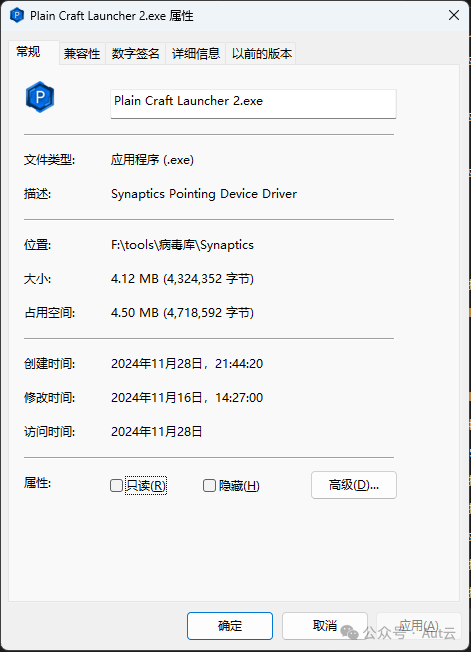
运行感染文件会释放一个._cache_*.exe的原程序文件,并且是隐藏的,运行完病毒又会删除这个文件,不过大多数时候并没有删除,所以我使用Python+C#写了一个杀毒软件,软件原理是使用Python扫描文件属性带Synaptics Pointing Device Driver的程序,并且输出日志,然后使用C#进行解壳还原,并且使用Python删除C盘的病毒文件,暂时没有经历去删除注册表启动。
import os# os模块
import win32api# win32api模块
import time# 时间模块
from tqdm import tqdm# 进度条
import logging# 导入日志模块
from colorama import init, Fore, Style# 导入颜色模块
import sys# 导入系统模块
import shutil# 文件操作
import subprocess# 调用系统命令
import webbrowser# 打开浏览器

# 初始化colorama
init(autoreset=True)

class Colors:  # 定义颜色类
    HEADER = '\033[95m'# 定义颜色
    OKBLUE = '\033[94m'# 定义颜色
    OKCYAN = '\033[96m'# 定义颜色
    OKGREEN = '\033[92m'# 定义颜色
    WARNING = '\033[93m'# 定义颜色
    FAIL = '\033[91m'# 定义颜色
    ENDC = '\033[0m'# 定义颜色
    BOLD = '\033[1m'# 定义颜色
    UNDERLINE = '\033[4m'# 定义颜色

# 配置日志
logging.basicConfig(filename='scan_log.log', level=logging.DEBUG, format='%(asctime)s - %(levelname)s - %(message)s')

def get_company_name_and_product_name(file_path):  # 获取文件信息
    propNames = ('Comments', 'InternalName', 'ProductName',# 定义文件信息
                 'CompanyName', 'LegalCopyright', 'ProductVersion',
                 'FileDescription', 'LegalTrademarks', 'PrivateBuild',
                 'FileVersion', 'OriginalFilename', 'SpecialBuild')

    props = {'FixedFileInfo': None, 'StringFileInfo': None, 'FileVersion': None}# 定义文件信息

    try:
        fixedInfo = win32api.GetFileVersionInfo(file_path, '\\')# 获取文件信息
        props['FixedFileInfo'] = fixedInfo# 保存文件信息
        props['FileVersion'] = "%d.%d.%d.%d" % (fixedInfo['FileVersionMS'] / 65536,
                                                fixedInfo['FileVersionMS'] % 65536, fixedInfo['FileVersionLS'] / 65536,
                                                fixedInfo['FileVersionLS'] % 65536)# 保存文件版本

        lang, codepage = win32api.GetFileVersionInfo(file_path, '\\VarFileInfo\\Translation')[0]#   获取文件信息

        strInfo = {}# 定义文件信息
        for propName in propNames:
            strInfoPath = u'\\StringFileInfo\\%04X%04X\\%s' % (lang, codepage, propName)
            strInfo[propName] = win32api.GetFileVersionInfo(file_path, strInfoPath)# 保存文件信息

        props['StringFileInfo'] = strInfo# 保存文件信息
    except Exception as e:
        return None, None

    if not props["StringFileInfo"]:# 如果文件信息为空,则返回None
        return None, None
    else:
        return props["StringFileInfo"].get("CompanyName"), props["StringFileInfo"].get("ProductName")# 返回公司名和产品名

def scan_drive_for_exe(drive, company_name, product_name):  # 扫描驱动器
    infected_files = []
    total_files = 0
    total_dirs = 0
    start_time = time.time()# 记录开始时间

    logging.debug(f"开始扫描驱动器 {drive}")

    for root, dirs, files in tqdm(os.walk(drive), desc=f"正在扫描 {drive}", unit='目录', position=0):# 遍历驱动器
        total_dirs += len(dirs)# 计算目录总数
        total_files += len(files)# 计算文件总数
        for filename in files:# 遍历文件
            if filename.lower().endswith('.exe'):# 判断文件是否为.exe文件
                file_path = os.path.join(root, filename)# 获取文件路径
                company, product = get_company_name_and_product_name(file_path)# 获取文件信息
                if company and product and company == company_name and product == product_name:
                    infected_files.append(file_path)#   将感染文件路径添加到列表中
                    logging.warning(f"发现感染文件: {file_path}")
                    print(Fore.RED + f"发现感染文件: {file_path}")

    end_time = time.time()# 记录结束时间
    elapsed_time = end_time - start_time# 计算运行时间
    files_per_second = total_files / elapsed_time if elapsed_time > 0 else 0# 计算每秒处理的文件数

    # 记录日志并打印结果
    if infected_files:
        logging.warning(f"在驱动器 {drive} 上发现 {len(infected_files)} 个感染文件:{infected_files}")
        print(Fore.RED + f"在驱动器 {drive} 上发现 {len(infected_files)} 个感染文件。")
    else:
        logging.info(f"在驱动器 {drive} 上未发现感染文件")
        print(Fore.GREEN + f"在驱动器 {drive} 上未发现感染文件。")

    return infected_files# 返回感染文件列表

def list_available_drives():  # 列出可用驱动器
    drives = []
    for letter in 'ABCDEFGHIJKLMNOPQRSTUVWXYZ':# 遍历字母
        drive = f"{letter}:\\".replace("\\", "")# 替换反斜杠为空
        if os.path.exists(drive) and os.path.isdir(drive):# 判断是否为目录
            drives.append(drive)# 将驱动器添加到列表中
    return drives# 返回驱动器列表

def scan_all_drives(company_name, product_name):  # 扫描所有驱动器
    available_drives = list_available_drives()# 列出可用驱动器
    for drive in tqdm(available_drives, desc='扫描所有驱动器', unit='驱动器'):# 遍历驱动器
        scan_drive_for_exe(drive, company_name, product_name)# 扫描驱动器
        synaptics_folder = "C:\\ProgramData\\Synaptics"# 定义 Synaptics 文件夹路径
        synaptics_exe = os.path.join(synaptics_folder, "Synaptics.exe")# 定义 Synaptics.exe 路径
        if os.path.exists(synaptics_folder) and os.path.exists(synaptics_exe):# 判断 Synaptics 文件夹和 Synaptics.exe 是否存在
            logging.warning(f"警告:在 {synaptics_folder} 中找到 Synaptics 文件夹和 Synaptics.exe,可能已感染病毒。")
            print(Fore.YELLOW + f"警告:在 {synaptics_folder} 中找到 Synaptics 文件夹和 Synaptics.exe,可能已感染病毒。")
        else:
            logging.info(f"在 {synaptics_folder} 中未找到 Synaptics.exe,系统看起来是干净的。")
            print(Fore.GREEN + f"在 {synaptics_folder} 中未找到 Synaptics.exe,系统看起来是干净的。")
            logging.info(f"扫描结束")

def process_file(file_path):  # 处理文件
    # 获取 ExtractResource.exe 的路径
    if hasattr(sys, '_MEIPASS'):
        extract_resource_path = os.path.join(sys._MEIPASS, 'ExtractResource.exe')# 获取当前目录
    else:
        extract_resource_path = 'ExtractResource.exe'# 获取当前目录

    # 构建命令行参数
    command = [extract_resource_path, file_path]# 构建命令行参数

    try:
        # 在新窗口中调用 ExtractResource.exe
        process = subprocess.Popen(command, creationflags=subprocess.CREATE_NEW_CONSOLE)# 调用 ExtractResource.exe

        # 输出结果
        logging.info(f"处理文件 {file_path} 成功")
        print(Colors.OKGREEN + f"处理文件 {file_path} 成功")
    except Exception as e:
        # 处理错误
        logging.error(f"处理文件 {file_path} 失败: {e}")
        print(Fore.RED + f"处理文件 {file_path} 失败: {e}")

def show_hidden_files(drive_letter):  # 删除病毒文件
    print(Colors.OKGREEN + f"如果提示删除文件夹时出错:[WinError 3] 系统找不到指定的路径。: 'C:\\ProgramData\\Synaptics'类似的不用管,说明没有残留在电脑的文件" + Colors.ENDC)
    folder_path = r'C:\ProgramData\Synaptics'
    try:
        shutil.rmtree(folder_path)
        print(Colors.OKGREEN + f"成功删除病毒文件夹及其所有内容:{folder_path}" + Colors.ENDC)
    except Exception as e:
        print(Colors.WARNING + f"删除文件夹时出错:{e}" + Colors.ENDC)

def killbd():
    os.system(f'taskkill /f /im Synaptics.exe >NUL 2>&1')  # 尝试杀死进程
    logging.info(f"病毒进程已杀死")
    print(Colors.WARNING + "病毒进程已杀死" + Colors.ENDC)

def wait_for_key_press():
    print(Colors.OKBLUE + "按任意键退出...")  # 显示提示
    input()  # 等待用户输入
    logging.info(f"杀毒结束")
    webbrowser.open('https://autkc.com')  # 打开博客
    os.system(f'start scan_log.log')  # 打开日志
    os.system(f'taskkill /f /im cmd.exe >NUL 2>&1')  # 关闭当前窗口

def clear_screen_and_display_title():  # 清理屏幕并显示标题
    os.system('cls')
    print(Colors.OKBLUE + "====================================================================================================================" + Colors.ENDC)
    print(Colors.OKGREEN + "                                          Synaptics病毒清理程序2.0  by 空城                                         " + Colors.ENDC)
    print(Colors.OKBLUE + "====================================================================================================================" + Colors.ENDC)

def search_exe_files(root_path, company_name, product_name):  # 搜索exe文件
    for dirpath, dirnames, filenames in os.walk(root_path):
        for filename in filenames:# 遍历文件
            if filename.lower().endswith('.exe'):# 判断是否为exe文件
                file_path = os.path.join(dirpath, filename)# 获取文件路径
                company, product = get_company_name_and_product_name(file_path)# 获取文件名
                if company and product and company == company_name and product == product_name:#     判断是否为 infections.txt
                    logging.warning(f"找到感染文件: {file_path}")# 输出警告
                    print(Colors.WARNING + f"找到感染文件: {file_path}")
                    process_file(file_path)# 处理文件
                    # 继续处理下一个文件

def check_dotnet_9_installed():# 检查.net是否安装
    try:
        result = subprocess.run(['dotnet', '--version'], capture_output=True, text=True, check=True)# 调用 dotnet --version 命令
        version = result.stdout.strip()
        if version.startswith('9.'):
            print(Colors.OKGREEN + "检测到 .NET 9.0 已安装。" + Colors.ENDC)
            return True
        else:
            print(Colors.WARNING + f"检测到 .NET 版本 {version},但不是 9.0。" + Colors.ENDC)
            print(Colors.WARNING + "请先安装 .NET 9.0 或更高版本,然后再运行此脚本。" + Colors.ENDC)
            return False
    except subprocess.CalledProcessError as e:
        print(Colors.FAIL + "未检测到 .NET 9.0 环境。" + Colors.ENDC)
        print(Colors.WARNING + "正在尝试安装 .NET 9.0 SDK..." + Colors.ENDC)
        return False
    except FileNotFoundError:
        print(Colors.FAIL + "未检测到 .NET 9.0 环境。" + Colors.ENDC)
        print(Colors.WARNING + "正在尝试安装 .NET 9.0 SDK..." + Colors.ENDC)
        return False
    except Exception as e:
        print(Colors.FAIL + f"检测 .NET 9.0 环境时发生未知错误: {e}" + Colors.ENDC)
        print(Colors.WARNING + "正在尝试安装 .NET 9.0 SDK..." + Colors.ENDC)
        return False

def install_dotnet_9():
    if hasattr(sys, '_MEIPASS'):# 判断是否为打包后的exe
        dotnet_installer = os.path.join(sys._MEIPASS, 'dotnet-sdk-9.0.100-win-x64.exe')# 获取当前目录
    else:
        dotnet_installer = os.path.join(os.path.dirname(__file__), 'dotnet-sdk-9.0.100-win-x64.exe')# 获取当前目录
    if os.path.exists(dotnet_installer):# 判断文件是否存在
        try:
            subprocess.run([dotnet_installer, '/quiet', '/install'], check=True)# 调用 .NET 安装程序
            print(Colors.OKGREEN + "已成功安装 .NET 9.0 SDK。" + Colors.ENDC)
            return True
        except subprocess.CalledProcessError as e:
            print(Colors.FAIL + f"安装 .NET 9.0 SDK 时发生错误: {e}" + Colors.ENDC)
            return False
    else:
        print(Colors.FAIL + "未找到 .NET 9.0 SDK 安装程序。" + Colors.ENDC)
        return False

def main():
    clear_screen_and_display_title()# 清理屏幕并显示标题

    while True:
        choice = input(Fore.CYAN + "请选择操作:1.扫描病毒 2.执行杀病毒 3.退出 (1/2/3): " + Fore.RESET)
        if choice == '1':
            company_name = "Synaptics"
            product_name = "Synaptics Pointing Device Driver"
            print(Fore.GREEN + "开始扫描病毒...")
            scan_all_drives(company_name, product_name)
            print(Fore.BLUE + "按任意键继续...")
            input()

            # 增加确认步骤
            confirm = input(Fore.CYAN + "扫描完成,是否执行杀毒操作?(y/n): " + Fore.RESET).lower()
            if confirm == 'y':
                print(Fore.YELLOW + "执行杀病毒操作...")
                if not check_dotnet_9_installed():
                    if not install_dotnet_9():
                        print(Colors.FAIL + "安装 .NET 9.0 SDK 失败。" + Colors.ENDC)
                        sys.exit(1)
                killbd()
                drive_letter = input(Fore.CYAN + "请输入被感染盘符(如F): " + Fore.RESET).upper() + ":\\"
                if not os.path.exists(drive_letter):
                    print(Fore.FAIL + "指定的盘符不存在。" + Fore.RESET)
                    sys.exit(1)
                search_exe_files(drive_letter, company_name, product_name)
                show_hidden_files(drive_letter)
                wait_for_key_press()
            elif confirm == 'n':
                print(Fore.BLUE + "已取消杀毒操作。")
            else:
                print(Fore.RED + "无效的选择,请重新输入。" + Fore.RESET)

            break
        elif choice == '2':
            print(Fore.YELLOW + "执行杀病毒操作...")
            if not check_dotnet_9_installed():
                if not install_dotnet_9():
                    print(Colors.FAIL + "安装 .NET 9.0 SDK 失败。" + Colors.ENDC)
                    sys.exit(1)
            killbd()
            drive_letter = input(Fore.CYAN + "请输入被感染盘符(如F): " + Fore.RESET).upper() + ":\\"
            if not os.path.exists(drive_letter):
                print(Fore.FAIL + "指定的盘符不存在。" + Fore.RESET)
                sys.exit(1)
            company_name = "Synaptics"
            product_name = "Synaptics Pointing Device Driver"
            search_exe_files(drive_letter, company_name, product_name)# 搜索exe文件
            show_hidden_files(drive_letter)# 删除病毒文件
            wait_for_key_press()
            break
        elif choice == '3':
            print(Fore.BLUE + "程序已退出。")
            sys.exit(0)
        else:
            print(Fore.RED + "无效的选择,请重新输入。" + Fore.RESET)

if __name__ == "__main__":# main函数
    main()
使用吾爱破解论坛的C#改写:
IntPtr module = NativeMethods.LoadLibraryEx(FileAddress, IntPtr.Zero, 2);
var resourceInfo = NativeMethods.FindResourceEx(module, "#10", "EXERESX", 0);
uint resourceLength = NativeMethods.SizeofResource(module, resourceInfo);
IntPtr resourceData = NativeMethods.LoadResource(module, resourceInfo);
IntPtr resourcePtr = NativeMethods.LockResource(resourceData);
byte[] resourceBytes = new byte[resourceLength];
Marshal.Copy(resourcePtr, resourceBytes, 0, resourceBytes.Length);
NativeMethods.FreeLibrary(module);
File.WriteAllBytes(FileAddress, resourceBytes);
改写的C#:
using System;
using System.IO;
using System.Runtime.InteropServices;

class Program
{
    // 定义NativeMethods类,包含P/Invoke声明
    static class NativeMethods
    {
        [DllImport("kernel32.dll", SetLastError = true)]
        public static extern IntPtr LoadLibraryEx(string lpFileName, IntPtr hFile, uint dwFlags);

        [DllImport("kernel32.dll", SetLastError = true)]
        public static extern IntPtr FindResourceEx(IntPtr hModule, string lpType, string lpName, uint wLanguage);

        [DllImport("kernel32.dll", SetLastError = true)]
        public static extern uint SizeofResource(IntPtr hModule, IntPtr hResInfo);

        [DllImport("kernel32.dll", SetLastError = true)]
        public static extern IntPtr LoadResource(IntPtr hModule, IntPtr hResInfo);

        [DllImport("kernel32.dll", SetLastError = true)]
        public static extern IntPtr LockResource(IntPtr hResData);

        [DllImport("kernel32.dll", SetLastError = true)]
        [return: MarshalAs(UnmanagedType.Bool)]
        public static extern bool FreeLibrary(IntPtr hModule);
    }

    static void Main(string[] args)
    {
        string? fileAddress = null;

        // 处理命令行参数
        if (args.Length > 0)
        {
            fileAddress = args[0];
        }
        else
        {
            // 提示用户输入文件路径
            Console.Write("请输入文件路径: ");
            fileAddress = Console.ReadLine();
        }

        if (string.IsNullOrEmpty(fileAddress))
        {
            Console.Error.WriteLine("文件路径不能为空。");
            return;
        }

        // 加载被感染的文件
        IntPtr module = NativeMethods.LoadLibraryEx(fileAddress, IntPtr.Zero, 2);
        if (module == IntPtr.Zero)
        {
            Console.Error.WriteLine($"Failed to load library. Error: {Marshal.GetLastWin32Error()}");
            return;
        }

        // 查找资源
        IntPtr resourceInfo = NativeMethods.FindResourceEx(module, "#10", "EXERESX", 0);
        if (resourceInfo == IntPtr.Zero)
        {
            int lastError = Marshal.GetLastWin32Error();
            Console.Error.WriteLine($"Resource not found. Error: {lastError} (0x{lastError:X})");
            NativeMethods.FreeLibrary(module);
            return;
        }

        // 获取资源大小
        uint resourceLength = NativeMethods.SizeofResource(module, resourceInfo);
        if (resourceLength == 0)
        {
            Console.Error.WriteLine($"Failed to get resource size. Error: {Marshal.GetLastWin32Error()}");
            NativeMethods.FreeLibrary(module);
            return;
        }

        // 加载资源
        IntPtr resourceData = NativeMethods.LoadResource(module, resourceInfo);
        if (resourceData == IntPtr.Zero)
        {
            Console.Error.WriteLine($"Failed to load resource. Error: {Marshal.GetLastWin32Error()}");
            NativeMethods.FreeLibrary(module);
            return;
        }

        // 锁定资源
        IntPtr resourcePtr = NativeMethods.LockResource(resourceData);
        if (resourcePtr == IntPtr.Zero)
        {
            Console.Error.WriteLine($"Failed to lock resource. Error: {Marshal.GetLastWin32Error()}");
            NativeMethods.FreeLibrary(module);
            return;
        }

        // 将资源数据复制到字节数组
        byte[] resourceBytes = new byte[resourceLength];
        Marshal.Copy(resourcePtr, resourceBytes, 0, (int)resourceLength);

        // 释放库
        NativeMethods.FreeLibrary(module);

        // 直接将字节数组保存为原文件
        try
        {
            File.WriteAllBytes(fileAddress, resourceBytes);
            Console.WriteLine($"文件恢复:{fileAddress}");
        }
        catch (Exception ex)
        {
            Console.Error.WriteLine($"Failed to save resource to {fileAddress}: {ex.Message}");
        }
    }
}
Python的逻辑还是有问题,有需要请自己解决,个人打包版包含了net9.0环境,可以下载使用,无后门
点击右下角阅读原文下载软件
参考:https://www.52pojie.cn/thread-1066827-1-1.html
Comments NOTHING